


学无止境
欢迎关注我的公众号
接收定期更新文章
【微服务实战】Spring Cloud Gateway 网关配置详解:统一入口、安全隔离与路由控制
2026-02-03 21:37:19
71


【微服务实战】gateway网关配置

上个章节已经完成服务之间的调用[链接],本章节继续探索。
spring Boot 版本 3.3.7
nacos 版本 3.1.1
Spring Cloud 版本 2023.0.3
Spring Cloud Alibaba 版本 2023.0.3.4

  • common 模块:存放公共工具类、实体、常量等

  • home 模块:Web 应用,端口 8081

  • user 模块:Web 应用,端口 8082

  • 实现目标:新建网关服务,通过规则访问user和home服务

1、gateway 网关模块

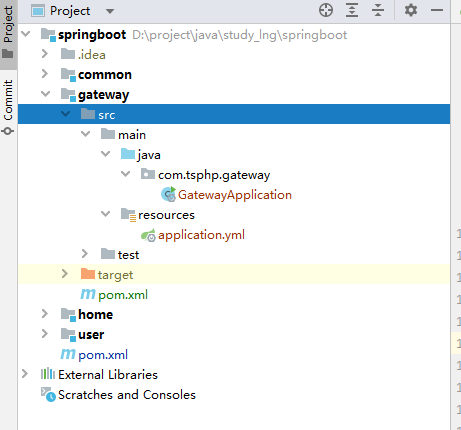
  • 目录结构

gateway/pom.xml

      
1
2
3
4
5
6
7
8
9
10
11
12
13
14
15
16
17
18
19
20
21
22
23
24
25
26
27
28
29
30
31
32
33
34
35
36
37
38
39
40
41
42
43
44
45
46
47
48
49
50
51
52
53
54
55
56
57
58
59
60
61
62
63
64
65
66
67
68
69
70
71
72
73
74
75
76
77
78
79
80

<?xml version="1.0" encoding="UTF-8"?>
<project xmlns="http://maven.apache.org/POM/4.0.0"
         xmlns:xsi="http://www.w3.org/2001/XMLSchema-instance"
         xsi:schemaLocation="http://maven.apache.org/POM/4.0.0 http://maven.apache.org/xsd/maven-4.0.0.xsd">
    <parent>
        <artifactId>springboot</artifactId>
        <groupId>com.tsphp</groupId>
        <version>1.0-SNAPSHOT</version>
    </parent>
    <modelVersion>4.0.0</modelVersion>
 
    <artifactId>gateway</artifactId>
 
    <dependencyManagement>
        <dependencies>
            <!-- Spring Cloud -->
            <dependency>
                <groupId>org.springframework.cloud</groupId>
                <artifactId>spring-cloud-dependencies</artifactId>
                <version>${spring-cloud.version}</version>
                <type>pom</type>
                <scope>import</scope>
            </dependency>
            <!-- Spring Cloud Alibaba -->
            <dependency>
                <groupId>com.alibaba.cloud</groupId>
                <artifactId>spring-cloud-alibaba-dependencies</artifactId>
                <version>${spring-cloud-alibaba.version}</version>
                <type>pom</type>
                <scope>import</scope>
            </dependency>
        </dependencies>
    </dependencyManagement>
 
    <dependencies>
        <dependency>
            <groupId>com.tsphp</groupId>
            <artifactId>common</artifactId>
            <version>1.0-SNAPSHOT</version>
        </dependency>
        <!-- Spring Cloud Gateway -->
        <dependency>
            <groupId>org.springframework.cloud</groupId>
            <artifactId>spring-cloud-starter-gateway</artifactId>
        </dependency>
        <!-- Nacos Discovery (服务注册与发现) -->
        <dependency>
            <groupId>com.alibaba.cloud</groupId>
            <artifactId>spring-cloud-starter-alibaba-nacos-discovery</artifactId>
        </dependency>
        <!-- 负载均衡 -->
        <dependency>
            <groupId>org.springframework.cloud</groupId>
            <artifactId>spring-cloud-starter-loadbalancer</artifactId>
        </dependency>
    </dependencies>
 
    <build>
        <resources>
            <resource>
                <directory>src/main/resources</directory>
                <includes>
                    <include>**.*</include>
                    <include>**/**.*</include>
                </includes>
                <filtering>false</filtering>
            </resource>
        </resources>
        <plugins>
            <plugin>
                <groupId>org.springframework.boot</groupId>
                <artifactId>spring-boot-maven-plugin</artifactId>
                <configuration>
                    <mainClass>com.tsphp.gateway.GatewayApplication</mainClass>
                </configuration>
            </plugin>
        </plugins>
    </build>
 
</project>

gateway/src/main/java/com/tsphp/gateway/GatewayApplication.java

      
1
2
3
4
5
6
7
8
9
10
11
12
13
14

package com.tsphp.gateway;
 
import org.springframework.boot.SpringApplication;
import org.springframework.boot.autoconfigure.SpringBootApplication;
import org.springframework.cloud.client.discovery.EnableDiscoveryClient;
 
@SpringBootApplication
@EnableDiscoveryClient
public class GatewayApplication {
    public static void main(String[] args) {
        SpringApplication.run(GatewayApplication.class, args);
    }
}
 

gateway/src/main/java/resources/application.yml

      
1
2
3
4
5
6
7
8
9
10
11
12
13
14
15
16
17
18
19
20
21
22
23
24
25
26
27
28
29
30
31
32
33
34
35
36

server:
  port: 9000 # 网关服务端口
 
spring:
  application:
    name: gateway-service # 网关服务名
  cloud:
    nacos: # Nacos配置
      discovery:
        server-addr: 127.0.0.1:8848
        namespace: public
        group: DEFAULT_GROUP
        username: study
        password: study123
    gateway:
      discovery:
        locator:
          enabled: false
      routes: # 路由配置
        - id: user-service
          uri: lb://user-service
          predicates: # 规则
            - Path=/user/**
        - id: home-service
          uri: lb://home-service
          predicates:
            - Path=/home/**
        - id: deny-all # 匹配不到返回403
          uri: no://op
          predicates:
            - Path=/**
          filters:
            - SetStatus=403
  config:
    import:
      - optional:nacos:${spring.application.name}.yaml  # 显示导入

2、服务启动

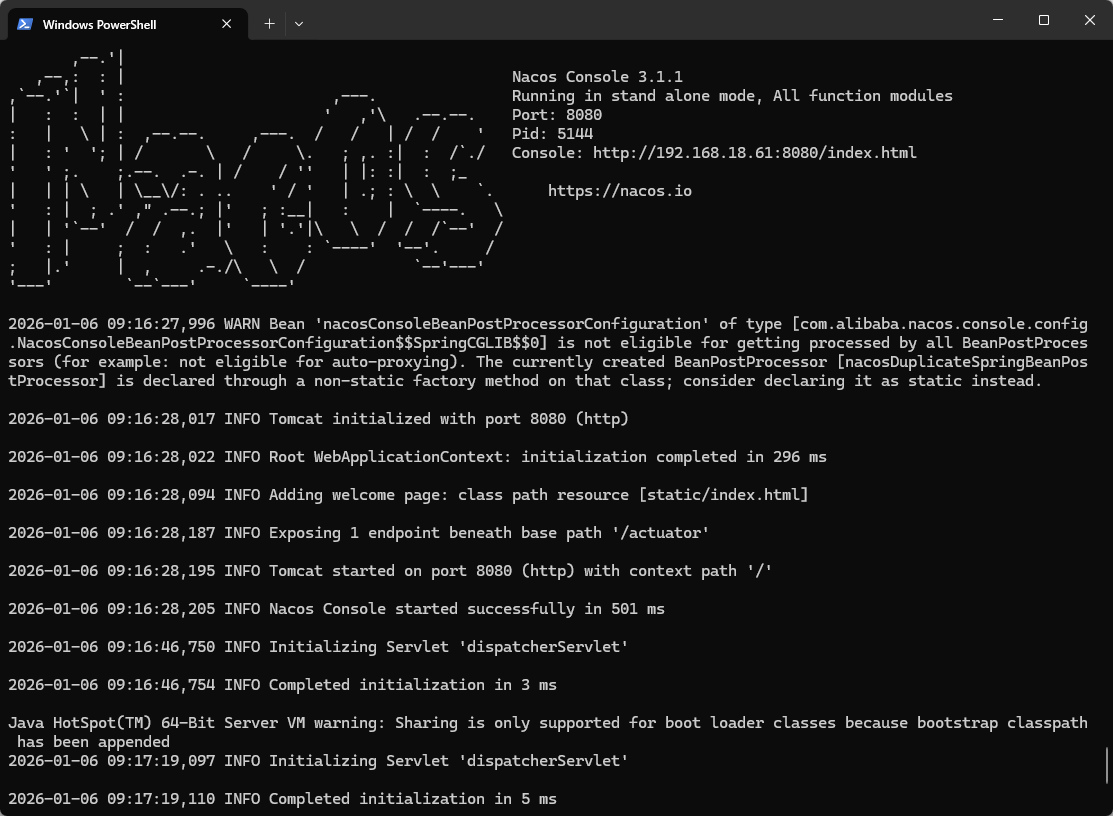
1)启动Nacos服务:

      
1
2

.\bin\startup.cmd -m standalone
#启动结果如下图:

2)启动Home服务
3)启动User服务
4)启动Gateway服务

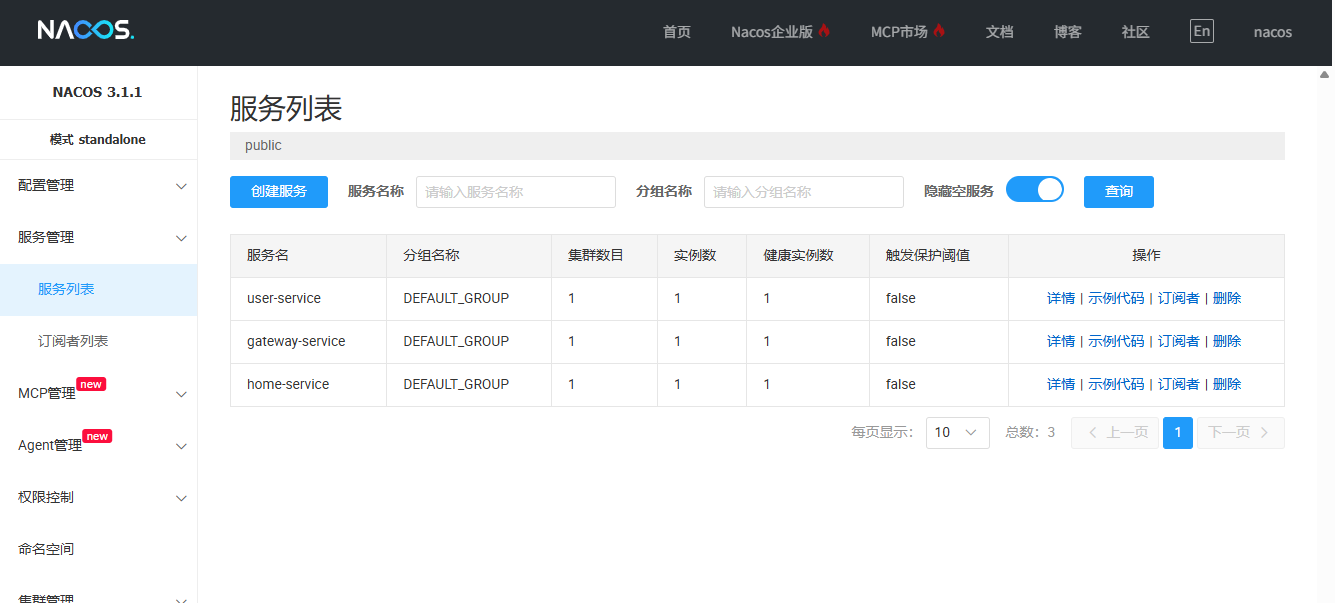
  • 上图标识 Nacos 已经注册了当前三个服务

  • 测试结果:

  • • 直接访问user服务:curl http://localhost:8082/user/info/2

  • • 返回:{"errcode":0,"errmsg":"","data":"userInfo:8082:2"}

  • • 网关访问user服务:curl http://localhost:9000/user/info/2

  • • 返回:{"errcode":0,"errmsg":"","data":"userInfo:8082:2"}

  • • 两个结果一致,网关已经正确路由到user服务了

gitee源码: https://gitee.com/wangshi90/springboot


【小结】

今天为微服务架构引入了 API 网关,显著提升了系统的安全性与可护性:

1)只需对外暴露网关端口(如 9000),所有业务服务(如 user-service、home-service)均可部署在内网,无需直接对外;

2)路由集中管理,新增或调整服务路径只需修改网关配置,无需改动客户端或服务本身。

留两个值得深入思考的问题:

1)如何通过网关实现“部分接口对外、部分接口仅限内部调用”?
(例如:/api/public/** 允许外部访问,/api/internal/** 仅允许服务间调用)

2)如何在转发请求时自动剥离网关路径前缀,避免将 /user/xxx 原样传给后端?
(即:外部请求 /user/profile → 后端实际接收 /profile)


微服务
API网关
Spring Cloud Gateway
Nacos
欢迎关注我的公众号,获取更多文章